Cybercriminals don't always need sophisticated hacking tools to breach a business. In many cases, all they need is a stolen password. That's why multi-factor authentication (MFA) has become one of the most effective ways to protect business accounts.
I have a friend who runs a small business. Nothing big. Just a handful of team members and clients. They do most of their work through emails and cloud apps. I got a call from him one morning. He was sounding completely off.
Someone had gotten into his email account overnight.
There was no complicated system failure or notable hacking scene. What happened? He entered his login details into a fake login page. He didn’t think twice before typing his password. And that was it.
In the next few hours, the hacker sent fake invoices to his clients from his own account.
You can imagine the damage. Confused clients, lost trust, a long day of explaining what happened.
The frustrating part is how preventable it was. One simple setting could have stopped the whole thing.
Multi-factor authentication. Businesses using Microsoft Entra ID can implement multi-factor authentication alongside Conditional Access policies to provide an additional layer of identity protection without disrupting everyday productivity.
What Is Multi-Factor Authentication?
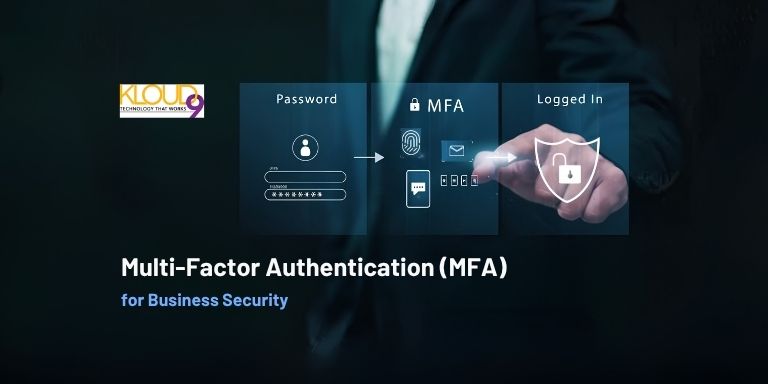
Multi-factor authentication, or MFA, just means you need more than one way to prove it’s actually you trying to log in. Not just your password.
So instead of typing a password and getting access immediately, you might also:
- Enter a short code sent to your phone
- Approve a login request through an app
- Use your fingerprint or face recognition
That’s it. One extra step.
It doesn’t sound like much, but that extra step changes everything.
According to Microsoft, enabling multi-factor authentication can prevent more than 99% of password-based account compromise attacks. While no security measure is perfect, MFA remains one of the most effective ways to reduce unauthorized access.
Why Passwords Alone Don’t Hold Up Anymore
Here’s the reality most people don’t think about. Passwords are weaker than they seem.
People reuse them across multiple accounts. They write them down. They choose something easy to remember, which usually means easy to guess.
Even strong passwords can still be stolen. Phishing emails are getting more convincing. Fake login pages look almost identical to the real ones. Data breaches happen more often than people realize.
So once someone has your password, what’s really stopping them?
If there’s no MFA in place, the answer is nothing. They log in, and from the system’s perspective, they look like you.
That’s the gap MFA is designed to close.
How MFA Actually Stops an Attack
Let’s go back to that earlier story.
If MFA had been turned on, things would’ve played out very differently.
The attacker enters the stolen password. Everything looks good for a second. Then the system asks for the second step.
A code gets sent to the real user’s phone. Or a notification pops up asking for approval.
And that’s where the attack stops.
The attacker doesn’t have the phone. They can’t approve the login. They’re locked out.
It’s a simple barrier, but it’s incredibly effective because most attacks rely on quick, easy access.
The Misconception That Holds People Back
A lot of people assume MFA is going to be annoying or complicated.
In reality, it’s not. Once you set it up, it becomes part of your routine. You log in, tap approve on your phone, and move on with your day.
It takes a few extra seconds. That’s it. And after a while, you barely notice it.
What you do notice is the peace of mind. You know that even if your password gets exposed somewhere, there’s still another layer protecting you.
Many organizations are also beginning to adopt passwordless authentication, using biometrics, security keys, or authentication apps instead of traditional passwords. Solutions like Microsoft Entra ID support passwordless sign-in, helping businesses reduce the risks associated with stolen or weak passwords while providing a faster and more convenient login experience.
Where MFA Makes the Biggest Difference
You don’t know where to start? Don’t overcomplicate things. Just focus on the accounts that matter most. At the top of that list should be email.
Your email is a big gateway for hackers. They can reset your passwords, impersonate you, and steal sensitive information once they can get into your email.
After that, other important accounts and systems to protect include:
- Microsoft 365 accounts, including Outlook, Teams, and SharePoint
- Cloud storage platforms where you keep important files
- Payment tools and financial systems
- Remote desktop (RDP) access and VPN connections
- CRM platforms containing customer information
- Accounting and payroll software
- HR systems storing employee records
- Business applications that contain sensitive information
- Admin accounts with higher-level access
These systems often contain your organization's most valuable data and are common targets for cybercriminals. Enabling MFA on these accounts significantly reduces the risk of unauthorized access and helps protect your entire business.
Why Small Businesses Can’t Ignore This
There’s still this idea floating around that cyberattacks mostly target big companies. That’s not really how things work anymore.
Smaller businesses are often easier targets. Fewer security layers, less monitoring, and sometimes a bit more trust in day-to-day operations.
Attackers know this. They’re not always looking for the biggest company. They’re looking for the easiest way in.
If your systems are protected with MFA and someone else’s aren’t, you’ve already made yourself a much harder target.
The Trade-Off Is Smaller Than You Think
Let’s be honest about it. MFA does add a tiny bit of friction.
You might need your phone nearby. You might have to approve a login. Occasionally, you’ll enter a code.
But compare that to what happens without it:
- Accounts getting taken over
- Clients receiving fake messages from you
- Time spent fixing damage and rebuilding trust
- Stress that could’ve been avoided
When you look at it that way, the trade-off isn’t really a debate.
Making It a Habit, Not a Hassle
The easiest way to think about MFA is like locking your front door when you leave home.
It’s not something you question every day. You just do it because it makes sense.
Once MFA is set up, it becomes part of how you log in. It doesn’t interrupt your work. It supports it quietly in the background.
And over time, it becomes second nature.
A Simple Step That Carries Real Weight
Cybersecurity can feel overwhelming. There’s always something new to learn, another tool, another setting, another risk.
But not everything needs to be complicated.
Multi-factor authentication is one of those rare things that gives you a lot of protection without requiring much effort. It’s simple to set up, easy to use, and incredibly effective against the most common types of attacks.
It doesn’t solve everything, but it blocks a huge percentage of real-world threats before they even get started.
MFA Best Practices for Businesses
✔ Enable MFA for every employee.
✔ Protect administrator accounts first.
✔ Use an authenticator app instead of SMS where possible.
✔ Review login activity regularly.
✔ Train employees to recognize phishing attempts.
✔ Require MFA for remote access and cloud applications.
✔ Keep recovery methods up to date.
Final Thoughts
If there’s one takeaway here, it’s this. Most cyberattacks don’t start with sophisticated techniques. They start with access. A stolen password, a rushed click, a moment of distraction.
MFA interrupts that process. It forces an extra check, one that attackers usually can’t pass.
One extra step might not sound like much, but in practice, it changes the outcome completely.
It turns what could’ve been a bad situation into a non-event. Whether you're protecting a small business or a growing organization, enabling multi-factor authentication is one of the simplest and most effective cybersecurity investments you can make. Combined with strong identity management and ongoing security awareness, MFA helps create a more resilient business that's better prepared for today's evolving cyber threats.
And sometimes, that’s exactly the kind of protection you need.